
PDF Too Large to Upload?
Updated by Khokhar Sab
Job, visa, exam and court portals cap the size of each file you upload, often at a few megabytes and sometimes far less. A PDF made from phone photos or scans is usually what breaks the limit. Type the limit into Compress PDF and it finds the lightest compression that fits; below is what that achieved on real scans, and what to do when it is not enough.
Why does a form say my PDF is too large?
Upload forms cap file size to keep their servers and reviewers manageable, and each sets its own number. USAJOBS takes resumes of 5 MB or less. Federal courts set their own caps; the Western District of Wisconsin allows 35 MB per PDF. Exam and visa portals can go much lower. The limit is usually printed next to the upload button.
Scans and phone photos are the usual reason a PDF is large: each page is a full picture, often with more detail than the page needs. Our guide Why Is My PDF So Large? measures each cause. For email rather than forms, see Email Attachment Size Limits for PDFs. A resume filled in from one of our resume templates is real text rather than a picture, so it starts far smaller than a scan of the same page.
How do I make a PDF small enough to upload?
Use Compress PDF with Target size and type the form's limit, such as 2 MB or 500 KB. It keeps the lightest compression that fits, so pictures lose no more detail than needed, and real text stays sharp. If the target cannot be met, it says so and gives the smallest file it made.
For common limits there are ready pages: 2 MB, 1 MB, 500 KB, 200 KB, 100 KB.
How small can a scanned PDF get?
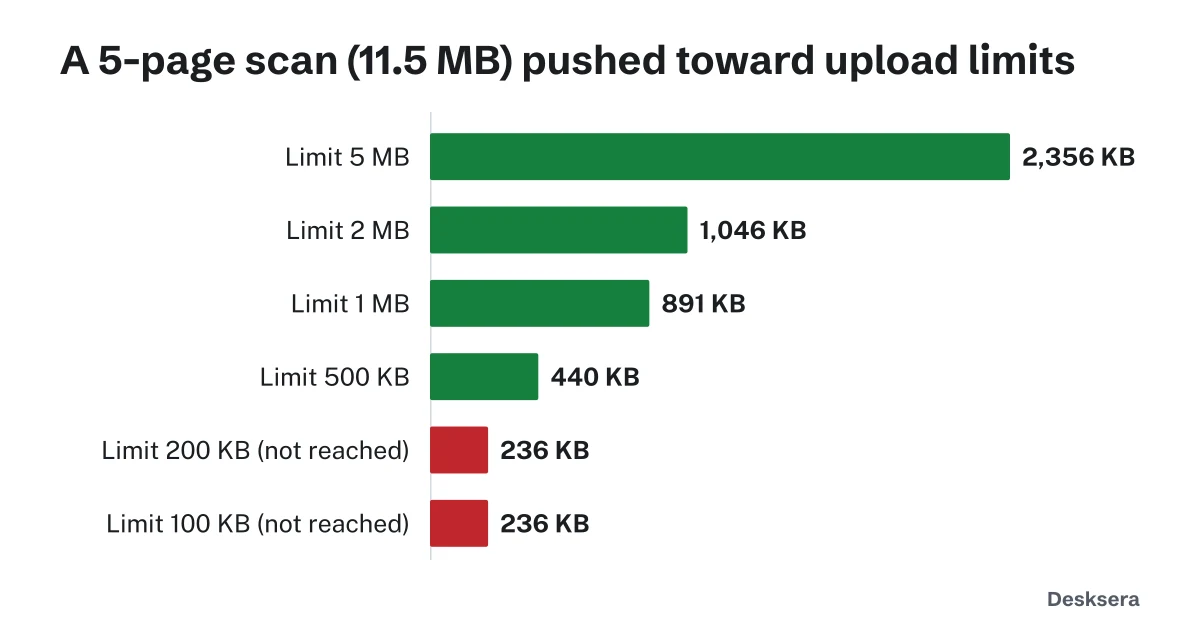
Very small, up to a point. Our 5-page scan from phone photos fit 5 MB, 2 MB, 1 MB and 500 KB, and OCR still read 100% of its words at 500 KB. Below that it bottomed out at 236 KB, at the lowest resolution the tool uses. A single scanned page fit even 100 KB.
| Limit | 1-page scan | 5-page scan | 5-page text still readable |
|---|---|---|---|
| 5 MB | 2348 KB | 2,356 KB | 100% of words |
| 2 MB | 1096 KB | 1,046 KB | 100% of words |
| 1 MB | 472 KB | 891 KB | 100% of words |
| 500 KB | 472 KB | 440 KB | 100% of words |
| 200 KB | 178 KB | 236 KB (not reached) | 99.6% of words |
| 100 KB | 89 KB | 236 KB (not reached) | 99.6% of words |
What if my PDF still will not fit?
Reduce what is in the file. Remove pages the form does not ask for, or split the document and upload the parts if the form allows several files. Rescan in black and white at 150 dpi instead of color photos. Convert typed documents from the original file instead of scanning a printout.
- Delete PDF pages to drop pages that are not required.
- Split PDF to upload a long document in parts.
- Compress PDF with the black and white option for color scans.
- Word to PDF for typed documents, instead of scanning them.
Know your limit? Open Compress PDF, choose Target size, and type it in. Nothing is uploaded until you upload it yourself.
Tools in this guide
More guides
- Email Attachment Size Limits for PDFsEach provider's limit from its own help page, and why a PDF grows 37% inside an email.
- Why Is My PDF So Large?What takes up the space in a PDF, measured, and how to fix each cause.
- PDF Compression TestFive kinds of PDF at every compression level: size saved and whether text stays readable, with CSV data.
Sources and further reading
- USAJOBS Help Center: How to add a resume to your profile: resumes of 5 MB or less, PDF recommended
- US District Court, Western District of Wisconsin: Size Limit for PDF Documents: 35 MB per PDF document