
PDF vs DOCX: Which Should You Send?
Updated by Khokhar Sab
Send a PDF when the other person should read, print or sign the document exactly as you made it. Send a DOCX when they need to edit it. That is the short answer; the details below come from building the same report as both and comparing them. To turn one into the other, use Word to PDF or PDF to Word.
What is the difference between PDF and DOCX?
A DOCX is a Word document: text, styles and pictures that the reading app lays out into pages when it opens the file. A PDF stores finished pages, with every letter placed and the fonts usually embedded. So a DOCX is easy to edit but can look different elsewhere; a PDF looks the same everywhere but is harder to edit.
When should I send a PDF instead of a DOCX?
Send a PDF for anything final: resumes, invoices, contracts, forms, reports and anything to be printed or signed. It keeps your layout on any device, opens in every browser without Word, and cannot be changed by accident. USAJOBS, for example, recommends uploading resumes as PDF to maintain formatting and page count.
A resume that runs two pages in your copy of Word can become three on a computer with different fonts; as a PDF it stays two. Our guide Why a Converted Document Looks Different measures how much fonts move text. To sign a PDF, use Sign PDF. The Resume Builder, the Cover Letter Template and the Invoice Generator skip the Word step and download a PDF directly.
When is a DOCX better than a PDF?
Send a DOCX when the other person needs to change the text: a draft for comments, a template, or a document someone else will finish. Word's tracked changes and comments work best in DOCX, and an editor may ask for it. If you only have a PDF and need to edit it, PDF to Word rebuilds the paragraphs and tables.
Small fixes do not need Word at all: Edit PDF adds and changes text, and Fill PDF fills in forms.
Which is smaller, PDF or DOCX?
It depends on the content. Our text report with a table was 11 KB as DOCX and 42 KB as PDF, because the PDF carries its fonts. With three 12-megapixel photos, the DOCX was 1,528 KB, since it stores pictures as they are, while the PDF export was 228 KB, because the exporter compressed them.
| Document | DOCX | PDF pages | |
|---|---|---|---|
| Text report with a table | 11 KB | 42 KB | 2 |
| Report with three 12 MP photos | 1,528 KB | 228 KB | 3 |
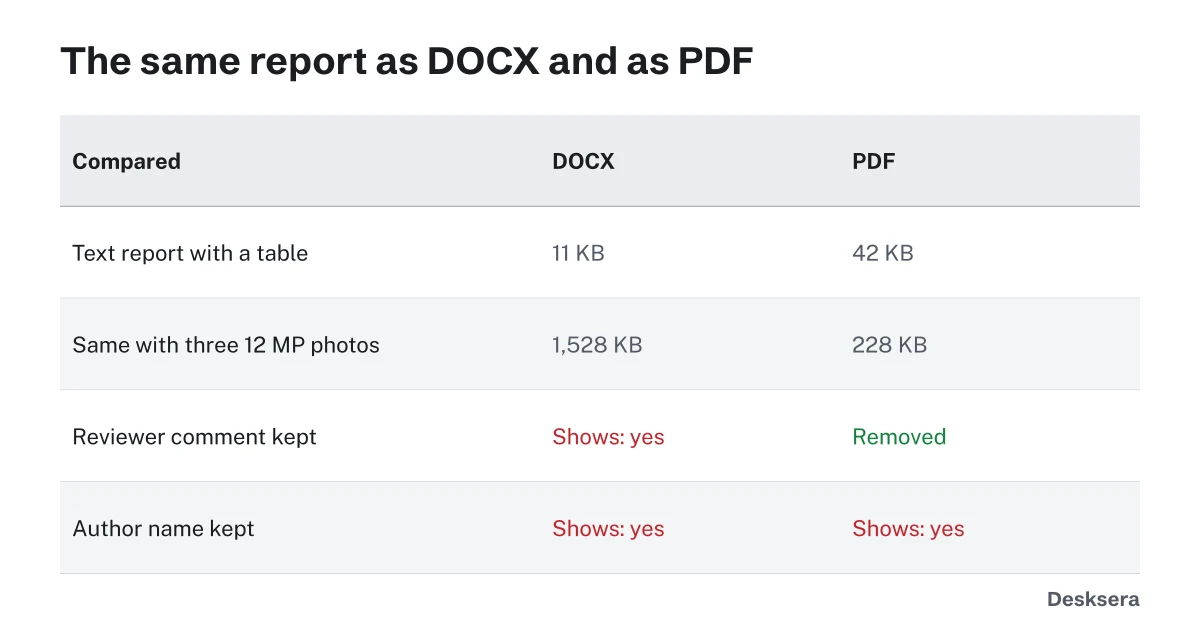
Built with the docx library and exported by LibreOffice 7.6 on 2026-10-12; script: scripts/measure-docx-pdf.mjs. Other exporters compress pictures differently.
If a PDF is still too large, Compress PDF shrinks its pictures further.
What hidden information do PDF and DOCX files keep?
Both can carry the author's name and other properties, and both did in our test. The DOCX also kept a reviewer's comment, which the person you send it to can read. The PDF export left the comment out by default, though some exporters can include comments. Check both before sending, and clear what you do not want to share.
| Kept in the file | DOCX | PDF export |
|---|---|---|
| Author name | Yes | Yes |
| Reviewer comment | Yes | No |
| Selectable, searchable text | Yes | Yes |
For a PDF, Remove PDF Metadata clears the author and other hidden details; our guide What PDF Metadata Reveals About You lists what to look for.
Ready to send? Turn your document into a fixed, shareable file with Word to PDF, right in your browser.
Tools in this guide
More guides
- Why a Converted Document Looks DifferentFonts and line spacing measured in 11 fonts: why lines and pages move, and how to stop it.
- How to Prepare PDFs for a Job ApplicationFormat, one file or several, size limits, file names and checks, with a real pack measured.
- Searchable vs Scanned PDFOne invoice as text, as a scan and after OCR: how to tell which you have, and how to fix a scan.
Sources and further reading
- USAJOBS Help Center: How to add a resume to your profile: recommends PDF to maintain formatting and number of pages
- Library of Congress: PDF, Version 1.7 (ISO 32000-1:2008): a plain description of the PDF format