
Is It Safe to Upload a PDF Online?
Updated by Khokhar Sab
Uploading a PDF online means a copy of it sits on someone else's computer, at least for a while. For a menu or a flyer that rarely matters; for a passport scan, a bank statement or a contract it can. Some tools never upload at all because they work inside your browser, as ours do; see how our tools work. Here is how to tell the difference yourself.
Is it safe to upload a PDF online?
It depends on the document and the service. Uploading sends a full copy of the file to a server you do not control, where it may be stored, logged or read. A reputable service that deletes files promptly is low risk for everyday files. For private ones, a tool that works on your device avoids the question.
What did the FBI warn about free file converters?
On March 7, 2025, the FBI Denver Field Office warned that criminals use free online document converters, such as tools that turn a .doc into a .pdf or join .jpg files into a PDF, to load malware onto computers. The tools do the job, but the result can hide malware, and uploads can be scraped for personal data.
The FBI listed what such tools can harvest from the files people submit: identity numbers and dates of birth, banking and cryptocurrency details, email addresses and passwords. It advised keeping antivirus software up to date, scanning any file you receive before opening it, and reporting incidents at ic3.gov. Separately from the FBI's list, treat a "converted" file that arrives as an .exe, or inside a .zip when you asked for a PDF, as a warning sign and do not open it.
How can I tell if a PDF tool uploads my file?
Watch the network. On a computer, press F12, open the Network tab and run the tool: an upload shows as a POST or PUT request about as large as your file. A simpler test works on any device: load the page, turn off Wi-Fi and mobile data, and run the tool. If it still works, it did not upload.
- Open the tool page and let it finish loading.
- Press F12 (or Cmd+Option+I on a Mac) and open the Network tab.
- Run the tool on a test file and watch the list: look for POST or PUT requests and their size.
- Or skip the panel: turn off Wi-Fi and mobile data after the page loads, and see if the tool still works.
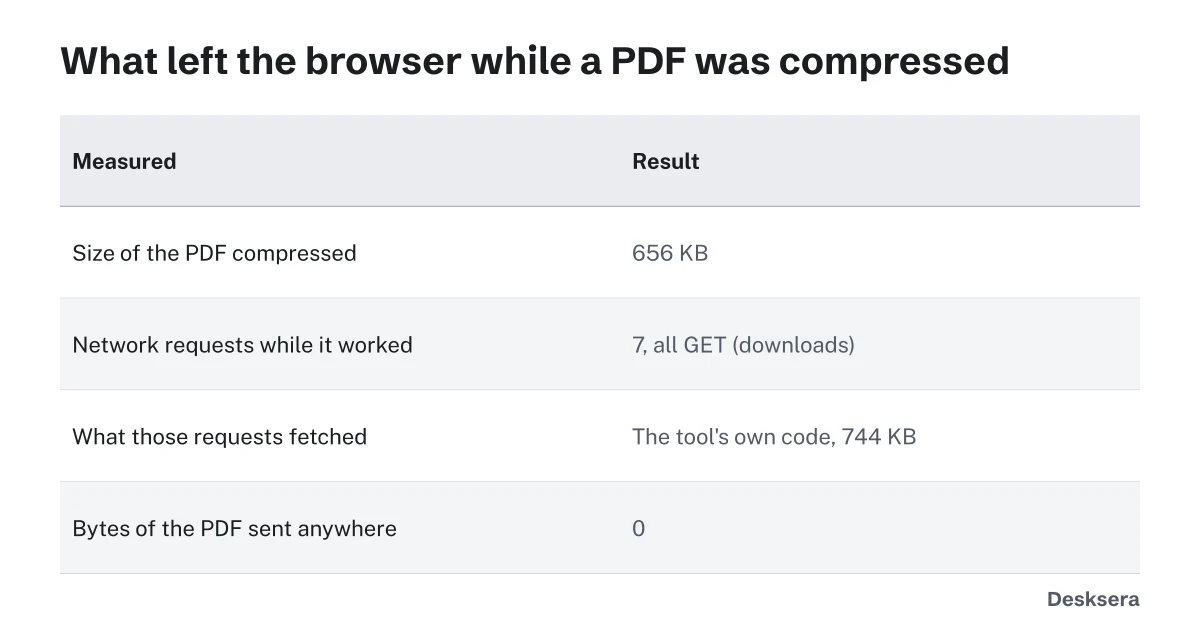
| What we measured on this site's Compress PDF | Result |
|---|---|
| PDF compressed | 656 KB, saved as 345 KB |
| Requests while it worked | 7, GET only |
| What they fetched | The tool's own code, 744 KB |
| Bytes of the PDF sent | 0 |
Which documents should not go to an online converter?
Keep anything that could be used to steal your identity or money away from tools that upload: passports, driving licences and ID cards, tax returns, bank and card statements, medical records, and signed contracts. The same goes for employer or client documents covered by confidentiality rules. Use a tool that works on your device.
If you must share such a file, consider removing what is not needed first: Redact PDF removes text for good, and Remove PDF Metadata clears hidden details such as author names; our guide What PDF Metadata Reveals About You shows what those can include.
How do I use online PDF tools more safely?
Check five things before you upload: that the address starts with https and is the site you meant; that the site says how long it keeps files and that it deletes them; that it claims no rights to your files; that the download is the type you asked for; and whether the tool works in your browser instead.
Close the tab when you are done, and delete downloaded results you no longer need. For more on how this site handles files, read How our tools work and the privacy policy.
Want a tool that never uploads? Try Compress PDF with Wi-Fi turned off after the page loads, and watch it work.
Tools in this guide
More guides
- How to Prepare PDFs for a Job ApplicationFormat, one file or several, size limits, file names and checks, with a real pack measured.
- Why Black Boxes Don't Redact a PDFA number hidden six ways, found again in five, plus real court and agency failures.
- PDF Open Password vs Permissions PasswordOne file locked both ways: what each password stopped, and which one keeps a PDF private.
Sources and further reading
- FBI Denver: FBI Denver Warns of Online File Converter Scam (March 7, 2025): malware and data scraping by fake converters, and what to do
- FBI Internet Crime Complaint Center (IC3): where to report online fraud in the US